Agama 19 - A New Beginning
In our previous post from November 2025 we already told you to expect a temporal slow down in this blog activity. And here we are, more than four months later, to finally break that hiatus by announcing a new Agama version. But, why did it take so long to go from Agama 18 to Agama 19?
The key is that Agama 19 is not just another incremental change. This new version of Agama actually represents a new starting point in several aspects, from the architectural design to the organization of the web user interface, including some rewritten components and much more.
Architectural revamp
We always wanted Agama to follow the schema displayed below, in which the core of the installer could be controlled through a consistent and simple programming interface (an API, in developers jargon). In that schema, the web-based user interface, the command-line tools and the unattended installation are built on top of that generic API.
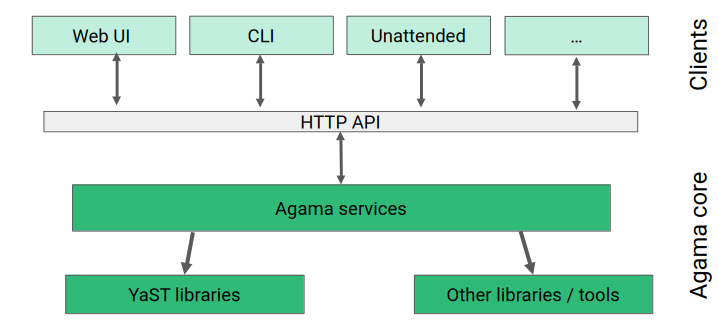
But previous versions of Agama were full of quirks that didn't allow us to define an API that would match our quality standards as a solid foundation to build a simple but comprehensive installer. Agama 19 represents a quite significant architectural overhaul, needed to leave all those quirks behind and to define mechanisms that can be the cornerstone for any future development (see #2951 and #2998).
Of course, such a drastic change opens the door for potential bugs. Your testing, feedback and kind bug reports will help us to consolidate the new mechanisms in upcoming Agama versions.
Note that, despite the redesign of the programming interface, the JSON-based configuration format remains fully backwards compatible. Any JSON or Jsonnet profile that worked in previous versions of Agama will keep working in Agama 19 and beyond.
In a similar way, we also expect to declare the Agama API as stable soon. So anyone could then write their own tools to directly interact with the Agama core, without depending on the web user interface or the Agama command-line tools.
Reorganization of the web user interface
Having a better API enabled us to adjust the web user interface to be closer to our original vision. We still have a long way to go in our road to a fully usable interface but the new navigation experience, based on a better overview page and a more useful confirmation dialog, sets the direction to follow (see #2988, #3009 and #3025).
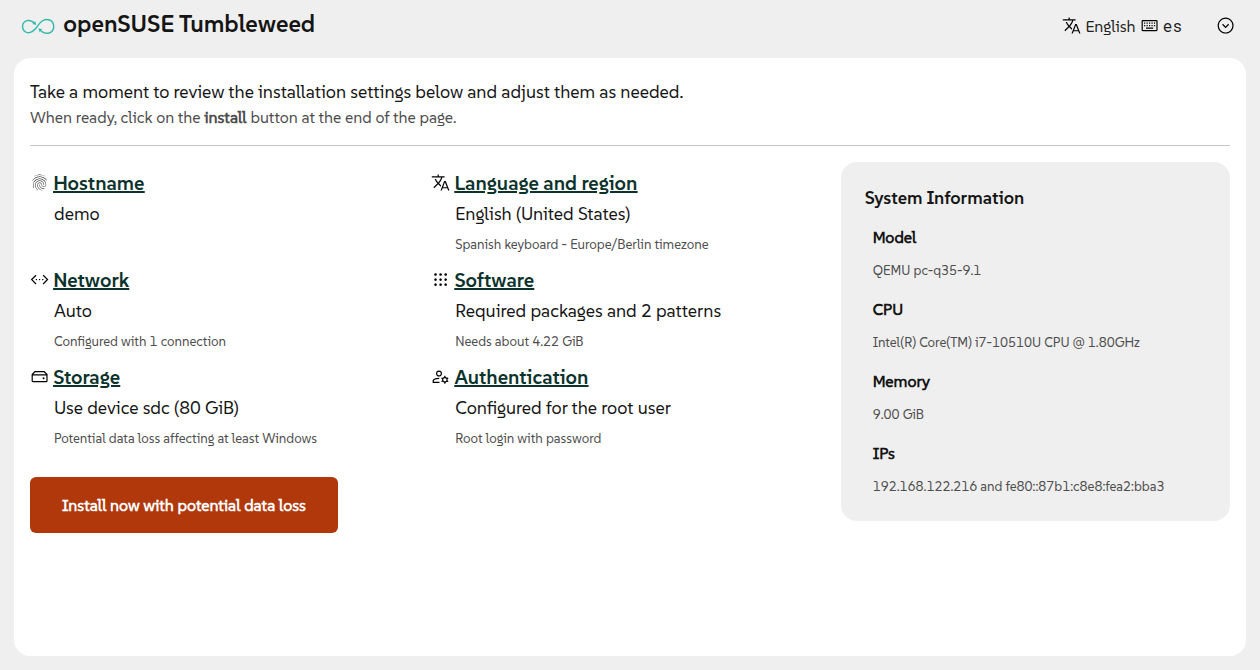
Although most configuration sections remain similar to previous versions of Agama, we plan to revamp some of them. The process has already started for the sections to configure iSCSI, DASD, zFCP and network.
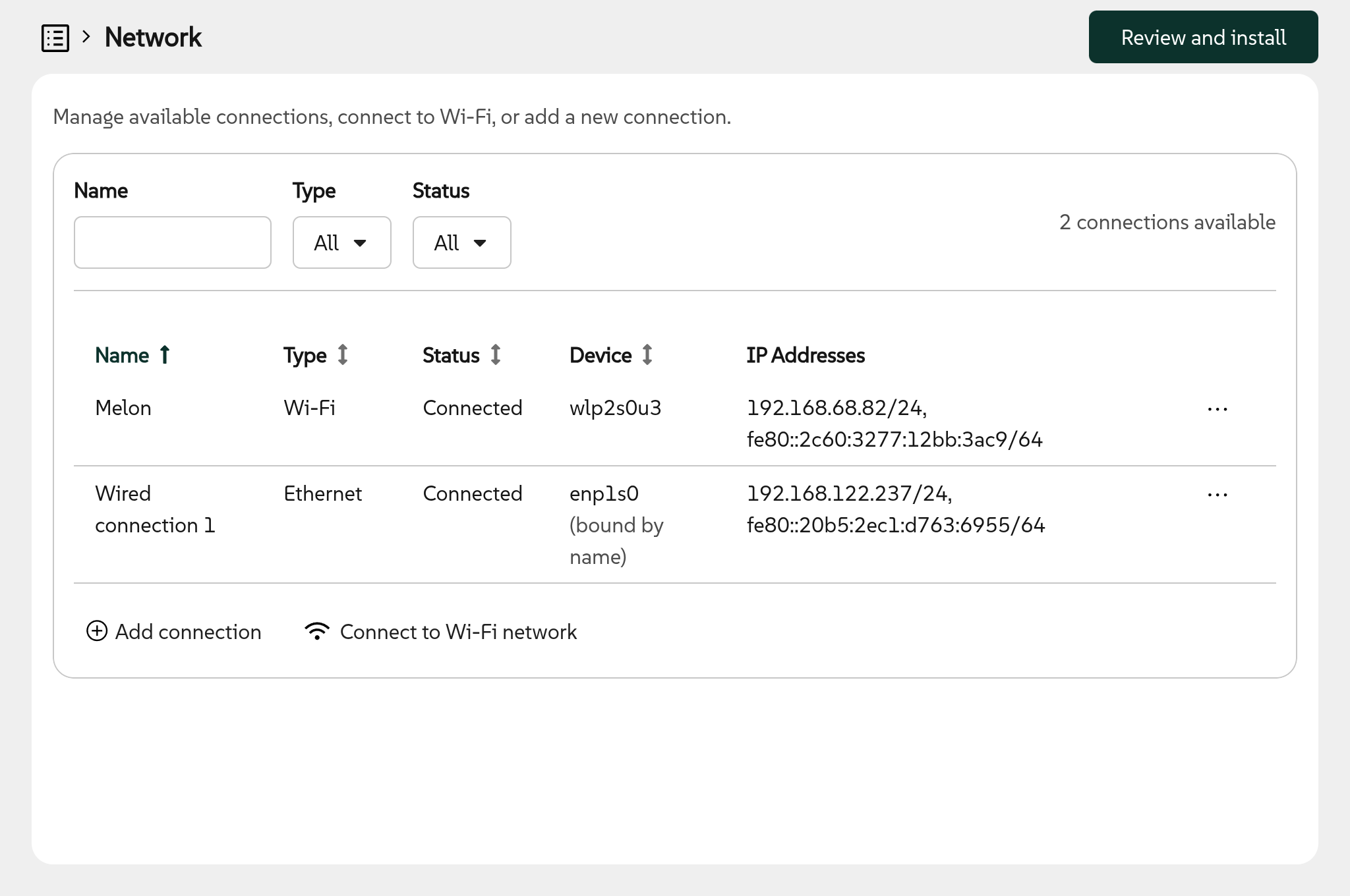
Regarding network, there are two important changes. On the one hand, now the user interface dynamicaly reacts to changes in the underlying system. For instance, when a new cable is plugged in or when a new WiFi adapter is connected (see #3285). On the other hand, now it is possible to define new ethernet connections. That is very relevant in installation scenarios with several network adapters that need to be configured in different ways. For example, where one network is used to access storage devices and another one is used to reach the installation repositories.
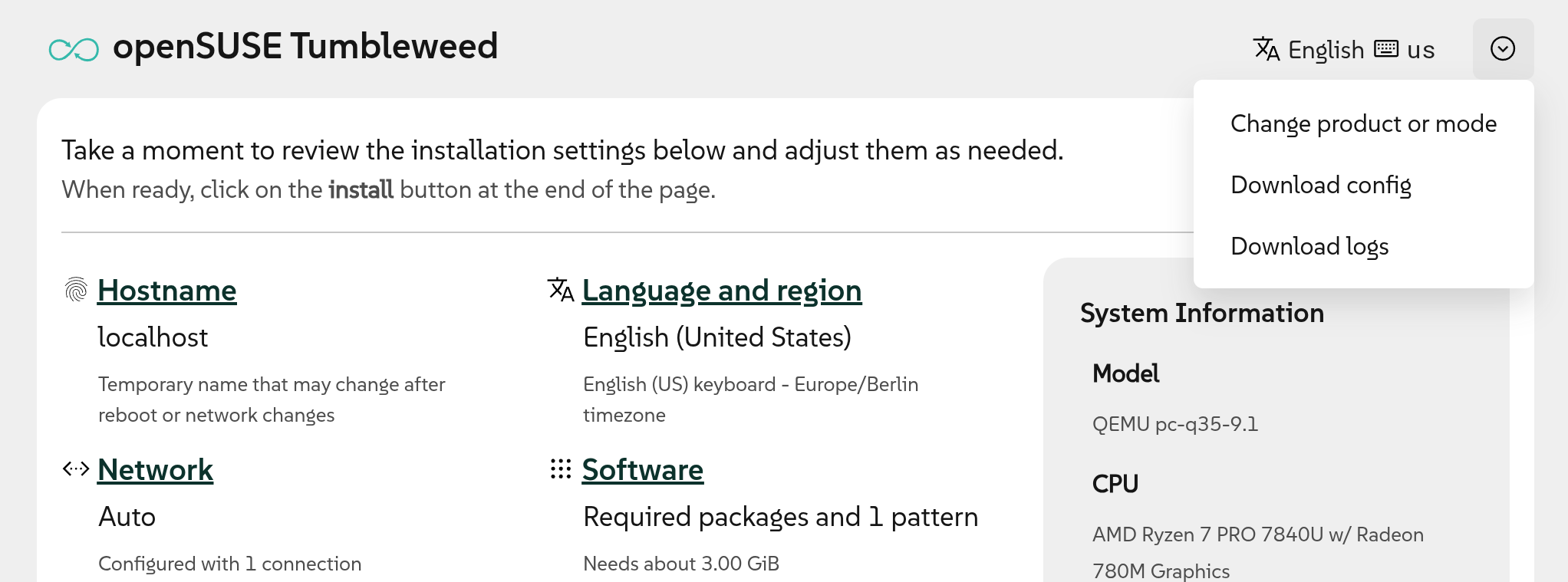
The web user interface also got a new option to download the current installer configuration in the JSON format used by the Agama command line tools and for unattended installation. That is the first step to turn the web interface into a useful learning and prototyping tool for more advanced scenarios, although this new functionality could benefit from several usability improvements. Stay tuned.
All the mentioned changes in the user interface will require several updates to the screenshots and guides available at the project home page. That will not happen overnight, so please bear with us during that gradual process. Of course, the page is (just like Agama itself) maintained in a public repository, so feel free to contribute to speed the process up.
Rewritten internal components
As you may know, YaST still lives in the core of Agama. Many tasks like managing storage devices or configuring the boot loader are done under the hood by the corresponding YaST modules (ie. yast2-storage-ng or yast2-bootloader). But lately the usage of some particular YaST modules became more a limiting factor than an advantage.
That is the case for yast2-users and yast2-software. Both are very complex due to historical reasons and to their ability to both install a new system and administer an already installed one, something that is out of the scope of Agama.
Thus, we decided to use the architectural revamp as an opportunity to replace those YaST parts with simpler implementations that will allow us to evolve faster in the future. Agama 19 includes its own management of users and, even more important and ambitious, its own management of software including the registration of SUSE Linux Enterprise and associated products and extensions (see #2915, #2978 and #2982).
Installation modes
But Agama 19 does not only bring restructuring and rewrites, it also comes with a bunch of new functionality, like the new ability to install some distributions in different so-called installation modes.
When installing the experimental pre-releases of SLES 16.1 or the corresponding version of SLES for SAP Applications, now it is possible to select between the Standard and the Immutable modes. See the following screenshot for details.
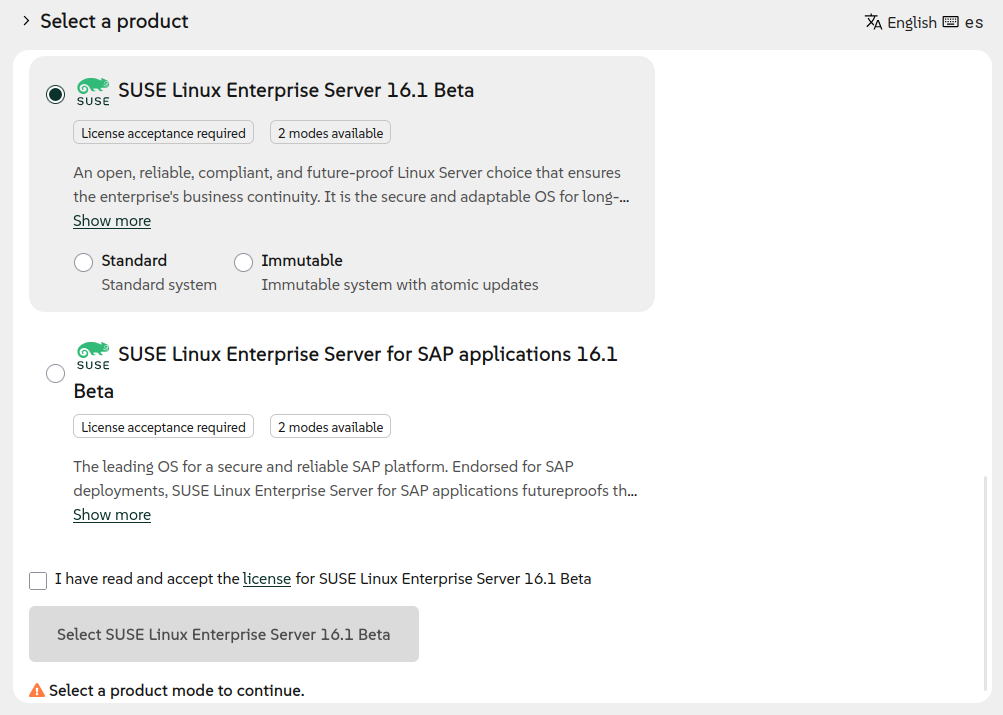
Agama support for installation modes is not limited to the use case illustrated above. Other distributions ("products" in Agama jargon) like openSUSE Leap or Tumbleweed may make use of modes in the future to redefine their software and storage configurations, offering different variants of a same operating system.
More configuration options
Although modes are the most visible of the new features, we also added other new capabilities to Agama that are, at least for now, only accessible using the JSON configuration. That makes those new features available for users of the command-line interface and of unattended installations.
Probably, the most awaited of those new features is the ability to install into an existing LVM volume group (see #3210). When doing so, it is possible to create new logical volumes within the pre-existing volume group and it is also possible to reuse, delete or resize the existing logical volumes. Agama 19 even allows to add new physical volumes to an existing volume group as part of the process. Most of those capabilities will soon be added to the web user interface.
We also extended the configuration of the boot loader with a new setting updateNvram (see
#3185) that, when disabled, prevents the boot
loader updates of the persistent RAM (NVRAM). That is an expert feature that was requested by
several users to handle broken firmwares or network setups.
Last but not least, now it is possible to specify several SSH public keys to authenticate the root user and also to use SSH keys as authentication mechanism for the non-root user created by Agama.
Many changes in the installation media
As you can see, Agama 19 is quite a significant release. But there is room for many things in four months, even to work beyond Agama itself. During this time we also incorporated several changes to the live ISO that most of you use to execute Agama.
Those changes include several improvements in the boot menu (like better support for
serial console or
adapted timeouts), dropping the "Boot from Disk"
option in most architectures, unifying the location of kernel and initramfs between the different
architectures and a new boot argument live.net_config_tui=1 (see
#2923) to trigger nmtui (an interactive
network configuration tool) before Agama starts.
Back to regular speed
It is clear that we consider Agama 19 to be a crucial milestone in the (still short) Agama history, but it is by no means the end of the path. Quite the opposite, we expect to recover our usual development pace and deliver new versions almost every month, as you can see in the updated roadmap.
But with great software rewrites comes great opportunity for new bugs, so we depend on your bug
reports, your feedback and your contributions to keep improving. Do not hesitate to reach us at the
Agama project at GitHub and the #yast channel at
Libera.chat.
Have a lot of fun!